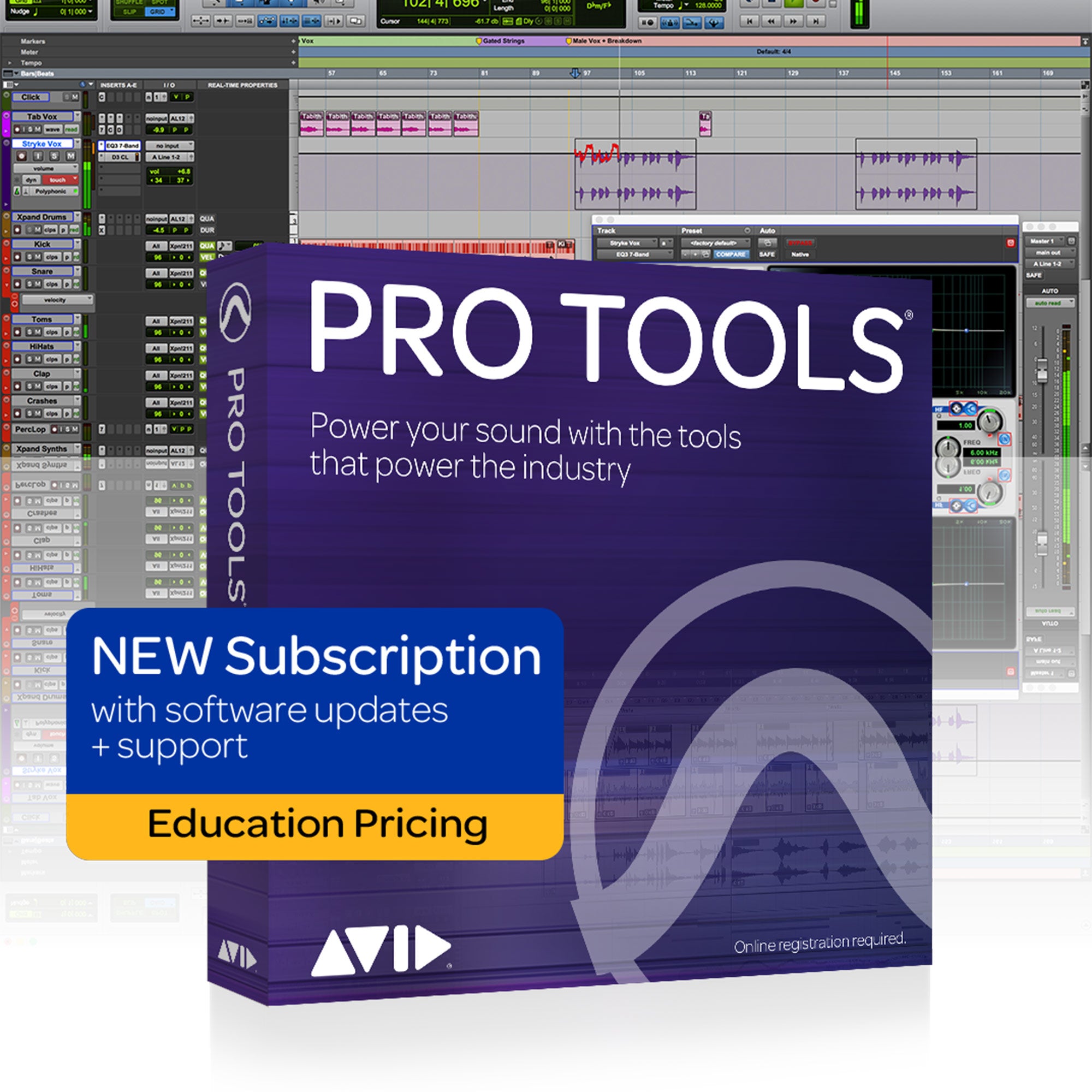


Avid Pro Tools Audio Workstation Software (Annual Subscription/Student-Teacher Edition)
Availability:
Electronic DownloadThis item is an electronic download. Please contact our sales team to purchase.
Description
Are you a student, teacher, or faculty member at a qualified academic institution? If so, you can purchase Pro Tools, Media Composer | Ultimate, and Sibelius | Ultimate at significantly discounted education pricing, as long as you meet one of the following eligibility requirements and can provide proof of eligibility.
Individuals qualified to activate an individual license at education pricing:
- University/college students—Students enrolled at a higher education institution defined as an accredited, government-recognized public or private university or college (including community, junior, or vocational college) that grants degrees and/or certificates1
- Faculty and staff—Teachers and staff employed by an accredited, government-recognized public or private primary or secondary school, local education authority, or public or private university or college, for-profit career/vocational schools that grant degrees and/or certificates, and schools for instrumental instruction/tuition
- Homeschool teachers—Teachers as defined by local homeschooling regulations detailed by the HSLDA in your state
- Secondary school students—Students enrolled at an accredited, government-recognized public or private secondary school providing full-time instruction1
- Homeschooled secondary students—Secondary students schooled at home, as defined by HSLDA local regulations
Pro Tools redefined the music, film, and TV industry, providing everything you need to compose, record, edit, and mix audio. From powerful recording and editing tools, easy loop workflows, and groundbreaking cloud collaboration, to top-notch effects and automated mixing, Pro Tools enables you to sound your best. And it keeps getting better, with new MIDI features that enable you to create at the speed of inspiration, tons of timesaving tools, and more flexible licensing.
Features:
- Search to access plug-ins and busses - search field integrated into the Inserts, Sends, Inputs, and Outputs menus
- Speed up multi-item menu selections - select multiple items in a menu in one fell swoop to boost workflow speed
- Edit audio in the groove - maintain relative grid position when copying, cutting, and pasting audio, MIDI, and notes
- Build sessions on the fly with Track Presets - catalog effects chains, session data, and other track settings
- Capture performances retroactively - Capture MIDI performances and advance musical ideas when not recording
- Take deeper control of your MIDI - a suite of MIDI key commands—transposing, trimming, and building chords
- Comp together the best takes - comp to a Target Playlist or cycle through different takes within a clip selection
- Retire your iLok key - Pro Tools and all Avid audio plug-ins now support iLok Cloud.
- Get a better view of your mix - view automation and EQ settings with graphs on all Mix window channel strips
- Start collaborating more easily - File > Start Collaboration saves and reopens your session as a project in the cloud
What's New in Pro Tools 2019:
Create your sound
From new virtual instruments, samples, and sounds, to tons of MIDI enhancements and track presets, Pro Tools keeps your creativity flowing. That’s why top artists, musicians, and audio professionals choose it for everything they do. Because when you need to sound your best, nothing delivers like Pro Tools.
Pro Tools 2019 delivers more power
From increased voice limits in Pro Tools | Ultimate and MIDI track counts, to more fluid track interactions during playback, Pro Tools 2019 delivers more power and performance to enable you to create your sound.
Regular feature-rich releases deliver value throughout the year
Avid delivers regular, meaningful Pro Tools updates to customers on active plans and subscriptions throughout the year. As they innovate new solutions, they deliver them, and Pro Tools 2019 is an example of this. Customers don’t have to wait for infrequent, monolithic releases.
Create more fluidly during playback
With the latest version of Pro Tools, you can now interact with and make updates to tracks and timeline selections during playback without interruption. Freely experiment with different effects, presets, loop points, and more as your music plays on, keeping you in your creative groove.
- Create or delete tracks
- Enable or disable tracks
- Add a preset to a track
- Insert, move, or remove plugins
- Insert, move, or remove sends
- Make changes to your I/O
- Record-enable and disable tracks
- Adjust start and end points of a loop or timeline selection
- Move an entire loop or timeline selection
Double your MIDI track count
Pro Tools now supports 1,024 MIDI tracks (up from 512), giving you the freedom to create colossal, richly orchestrated pieces. With a larger palette of instruments and articulations at your disposal, you can spend more time creating and less time stressing on setup workarounds or having to forgo certain articulations. It’s ideal for film scoring and ardent sample library users, where MIDI tracks can quickly run up into the hundreds.
Name tracks faster
Pro Tools now lets you name new tracks as you create them, providing a new “Name” field in the New Track dialog. This makes it faster and easier to name multiple new tracks in one fell swoop. If you don’t immediately give a new track a name, Pro Tools will automatically create a default name for you, respective of the track type, making it easy to understand what it is if you forget to name one.
Create with the latest Apple products
With support for macOS Mojave (10.14), you can now use Pro Tools on any Mac running Apple’s latest OS to boost your creative performance.
Get easy multiseat licensing
Need Pro Tools for a large post, broadcast, or media education facility? You can purchase a Pro Tools or Pro Tools | Ultimate Multiseat License, which includes the Avid Complete Plugin Bundle—plus HEAT, Pro Tools | MachineControl, and Pro Tools | DigiLink I/O License with all Pro Tools | Ultimate seats. This server-based PACE floating license not only makes administering licenses faster and easier, it reduces licensing complexity and eliminates the need for iLoks across your facility.
Work with unlimited projects
Got a lot more song ideas in your head? You can now create and save as many projects as you want locally on your computer, giving you unlimited creative freedom. You can choose up to any three projects to sync to the cloud for anytime, anywhere access. And cycle through any three projects at a time when you’re ready to work on them—simply select the “Synchronized to Cloud” checkbox of any project to toggle session sync on or off.
| Pro Tools 2019 System Requirements | |
| Mac | Intel¨ Mac with Mac OS X 10.11.6, macOS 10.12.6, 10.13.6 or 10.4.3 Intel¨ Core i5 processor (Pro Tools Standard), Intel¨ Core i7 processor (Pro Tools | Ultimate) 16GB RAM (32GB or more recommended) Internet connection for installation 15GB disk space for installation PCIe slot for HDX or HD Native card (incl. one power connection on motherboard), Thunderbolt-port for supported PCIe-chassis or USB-port, FireWire-port or Thunderbolt-port for CoreAudio-supported audio device Supports 64-bit AAX plug-ins in Pro Tools |
| Windows | Intel¨ PC Windows 8.1 (Standard and Pro 64-bit Editions) and Windows 10 (Home, Pro, and Enterprise 64-bit Editions) NOTE: Windows 10 Pro for Workstations is not currently supported Intel¨ Core i5 processor (Pro Tools Standard), Intel¨ Xeon processor (Pro Tools | Ultimate) 16GB RAM (32GB or more recommended) Internet connection for installation 15GB disk space for installation PCIe slot for HDX or HD Native card (incl. one power connection on motherboard) or USB-port, FireWire-port for ASIO-supported audio device Supports 64-bit AAX plug-ins in Pro Tools |
| Copy Protection | iLok 2, iLok 3, or iLok Cloud (Note: Original iLok 1 not supported) |
| Audio Drive Requirements | One or more hard disk drives dedicated for audio record and playback. Audio drives should be formatted HFS+ Journaled for Mac or NTFS for Windows When daisy-chaining a Thunderbolt drive and expansion chassis, the drive should be placed at the end of the chain |
| Graphics Card | Dedicated graphics card highly recommended for desktop workstations. |
| Audio File Type / Session Support | Supported: BWF, AIFF, MXF Not Supported: SD2 audio files and Pro Tools 4.x sessions and lower |
| Plugin Types | Pro Tools supports DSP, Native and AudioSuite 64-bit AAX plug-in types only. Earlier TDM, RTAS and AudioSuite ".dpm" plug-ins are not supported 32-bit AAX plug-ins are not supported. |
Are you a student, teacher, or faculty member at a qualified academic institution? If so, you can purchase Pro Tools, Media Composer | Ultimate, and Sibelius | Ultimate at significantly discounted education pricing, as long as you meet one of the following eligibility requirements and can provide proof of eligibility.
Individuals qualified to activate an individual license at education pricing:
- University/college students—Students enrolled at a higher education institution defined as an accredited, government-recognized public or private university or college (including community, junior, or vocational college) that grants degrees and/or certificates1
- Faculty and staff—Teachers and staff employed by an accredited, government-recognized public or private primary or secondary school, local education authority, or public or private university or college, for-profit career/vocational schools that grant degrees and/or certificates, and schools for instrumental instruction/tuition
- Homeschool teachers—Teachers as defined by local homeschooling regulations detailed by the HSLDA in your state
- Secondary school students—Students enrolled at an accredited, government-recognized public or private secondary school providing full-time instruction1
- Homeschooled secondary students—Secondary students schooled at home, as defined by HSLDA local regulations
Pro Tools redefined the music, film, and TV industry, providing everything you need to compose, record, edit, and mix audio. From powerful recording and editing tools, easy loop workflows, and groundbreaking cloud collaboration, to top-notch effects and automated mixing, Pro Tools enables you to sound your best. And it keeps getting better, with new MIDI features that enable you to create at the speed of inspiration, tons of timesaving tools, and more flexible licensing.
Features:
- Search to access plug-ins and busses - search field integrated into the Inserts, Sends, Inputs, and Outputs menus
- Speed up multi-item menu selections - select multiple items in a menu in one fell swoop to boost workflow speed
- Edit audio in the groove - maintain relative grid position when copying, cutting, and pasting audio, MIDI, and notes
- Build sessions on the fly with Track Presets - catalog effects chains, session data, and other track settings
- Capture performances retroactively - Capture MIDI performances and advance musical ideas when not recording
- Take deeper control of your MIDI - a suite of MIDI key commands—transposing, trimming, and building chords
- Comp together the best takes - comp to a Target Playlist or cycle through different takes within a clip selection
- Retire your iLok key - Pro Tools and all Avid audio plug-ins now support iLok Cloud.
- Get a better view of your mix - view automation and EQ settings with graphs on all Mix window channel strips
- Start collaborating more easily - File > Start Collaboration saves and reopens your session as a project in the cloud
What's New in Pro Tools 2019:
Create your sound
From new virtual instruments, samples, and sounds, to tons of MIDI enhancements and track presets, Pro Tools keeps your creativity flowing. That’s why top artists, musicians, and audio professionals choose it for everything they do. Because when you need to sound your best, nothing delivers like Pro Tools.
Pro Tools 2019 delivers more power
From increased voice limits in Pro Tools | Ultimate and MIDI track counts, to more fluid track interactions during playback, Pro Tools 2019 delivers more power and performance to enable you to create your sound.
Regular feature-rich releases deliver value throughout the year
Avid delivers regular, meaningful Pro Tools updates to customers on active plans and subscriptions throughout the year. As they innovate new solutions, they deliver them, and Pro Tools 2019 is an example of this. Customers don’t have to wait for infrequent, monolithic releases.
Create more fluidly during playback
With the latest version of Pro Tools, you can now interact with and make updates to tracks and timeline selections during playback without interruption. Freely experiment with different effects, presets, loop points, and more as your music plays on, keeping you in your creative groove.
- Create or delete tracks
- Enable or disable tracks
- Add a preset to a track
- Insert, move, or remove plugins
- Insert, move, or remove sends
- Make changes to your I/O
- Record-enable and disable tracks
- Adjust start and end points of a loop or timeline selection
- Move an entire loop or timeline selection
Double your MIDI track count
Pro Tools now supports 1,024 MIDI tracks (up from 512), giving you the freedom to create colossal, richly orchestrated pieces. With a larger palette of instruments and articulations at your disposal, you can spend more time creating and less time stressing on setup workarounds or having to forgo certain articulations. It’s ideal for film scoring and ardent sample library users, where MIDI tracks can quickly run up into the hundreds.
Name tracks faster
Pro Tools now lets you name new tracks as you create them, providing a new “Name” field in the New Track dialog. This makes it faster and easier to name multiple new tracks in one fell swoop. If you don’t immediately give a new track a name, Pro Tools will automatically create a default name for you, respective of the track type, making it easy to understand what it is if you forget to name one.
Create with the latest Apple products
With support for macOS Mojave (10.14), you can now use Pro Tools on any Mac running Apple’s latest OS to boost your creative performance.
Get easy multiseat licensing
Need Pro Tools for a large post, broadcast, or media education facility? You can purchase a Pro Tools or Pro Tools | Ultimate Multiseat License, which includes the Avid Complete Plugin Bundle—plus HEAT, Pro Tools | MachineControl, and Pro Tools | DigiLink I/O License with all Pro Tools | Ultimate seats. This server-based PACE floating license not only makes administering licenses faster and easier, it reduces licensing complexity and eliminates the need for iLoks across your facility.
Work with unlimited projects
Got a lot more song ideas in your head? You can now create and save as many projects as you want locally on your computer, giving you unlimited creative freedom. You can choose up to any three projects to sync to the cloud for anytime, anywhere access. And cycle through any three projects at a time when you’re ready to work on them—simply select the “Synchronized to Cloud” checkbox of any project to toggle session sync on or off.
| Pro Tools 2019 System Requirements | |
| Mac | Intel¨ Mac with Mac OS X 10.11.6, macOS 10.12.6, 10.13.6 or 10.4.3 Intel¨ Core i5 processor (Pro Tools Standard), Intel¨ Core i7 processor (Pro Tools | Ultimate) 16GB RAM (32GB or more recommended) Internet connection for installation 15GB disk space for installation PCIe slot for HDX or HD Native card (incl. one power connection on motherboard), Thunderbolt-port for supported PCIe-chassis or USB-port, FireWire-port or Thunderbolt-port for CoreAudio-supported audio device Supports 64-bit AAX plug-ins in Pro Tools |
| Windows | Intel¨ PC Windows 8.1 (Standard and Pro 64-bit Editions) and Windows 10 (Home, Pro, and Enterprise 64-bit Editions) NOTE: Windows 10 Pro for Workstations is not currently supported Intel¨ Core i5 processor (Pro Tools Standard), Intel¨ Xeon processor (Pro Tools | Ultimate) 16GB RAM (32GB or more recommended) Internet connection for installation 15GB disk space for installation PCIe slot for HDX or HD Native card (incl. one power connection on motherboard) or USB-port, FireWire-port for ASIO-supported audio device Supports 64-bit AAX plug-ins in Pro Tools |
| Copy Protection | iLok 2, iLok 3, or iLok Cloud (Note: Original iLok 1 not supported) |
| Audio Drive Requirements | One or more hard disk drives dedicated for audio record and playback. Audio drives should be formatted HFS+ Journaled for Mac or NTFS for Windows When daisy-chaining a Thunderbolt drive and expansion chassis, the drive should be placed at the end of the chain |
| Graphics Card | Dedicated graphics card highly recommended for desktop workstations. |
| Audio File Type / Session Support | Supported: BWF, AIFF, MXF Not Supported: SD2 audio files and Pro Tools 4.x sessions and lower |
| Plugin Types | Pro Tools supports DSP, Native and AudioSuite 64-bit AAX plug-in types only. Earlier TDM, RTAS and AudioSuite ".dpm" plug-ins are not supported 32-bit AAX plug-ins are not supported. |
Your home for all things pro audio—backed by expertise and experience. Connect with us today.
Your home for all things pro audio—backed by expertise and experience. Connect with us today.