
%20is%20an%20add-on%20module%20for%20Eclipse%C2%A8%C3%8AEHX%20wh...
)
Clear-Com DYNAM-EC-SITE-HX - Dynam-EC Site License for Eclipse HX
Availability:
Special Order ItemThis item is not stocked and needs to be ordered from the manufacturer. Please contact our sales team for more information.
Description
EHX Software; Dynam-EC, site license. Site License for when 10 or more Dynam-EC licenses are required for one site.
Dynamic Eclipse Configuration (Dynam-EC) is an add-on module for Eclipse¨ÊEHX which enables one or more operators to monitor and assign IFBs, conferences and external lines in real-time. Dynam-EC's comprehensive management capabilities include multi-point visual and audible IFB monitoring from PC or tablet-based control surfaces.
Port Palette and Central Canvas
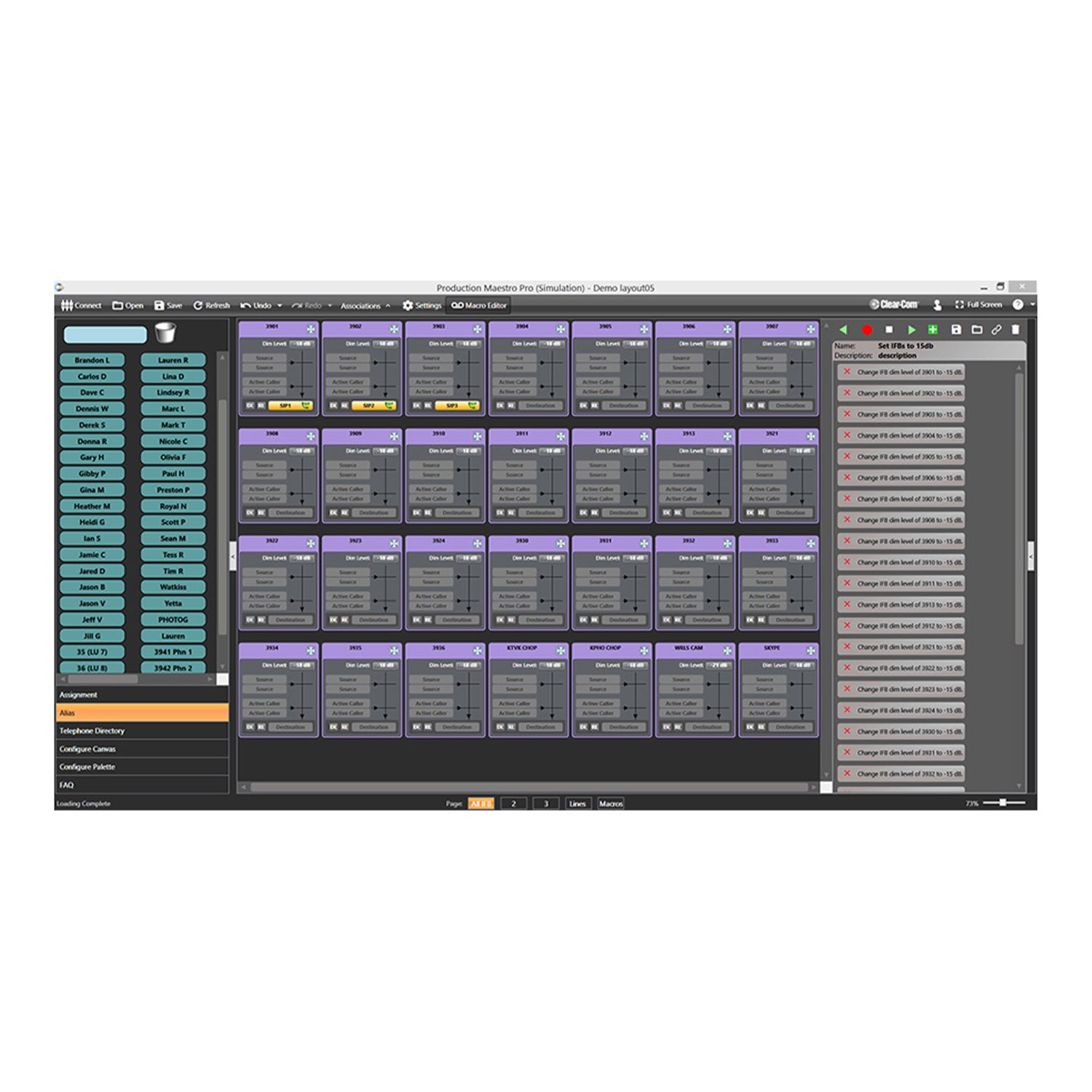
Dynam-EC's main screen shows a canvas area where intercom resources are placed to provide a real-time graphical view of assignments, audio levels and audio routing activity. The detailed presentation of each resource may be tailored to each installation's requirements for audio monitoring and/or assignment.
IFBs and Conferences
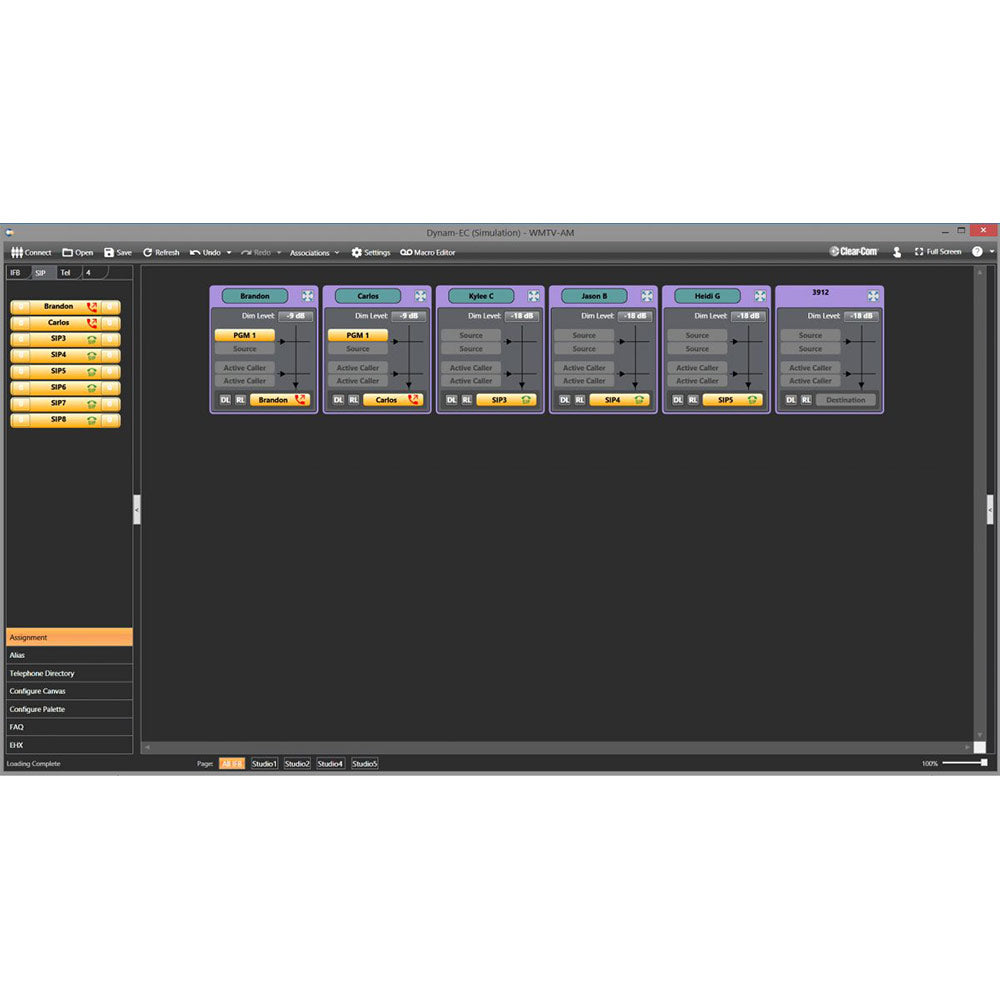
As with other canvas resources, conferences are presented in a graphical format, showing current feed assignments, active members and alias labels. Similar to conferences, IFBs are presented as graphical objects which show IFB source (Program, Mix Minus, etc.), callers (Intercom Panels), destinations, audio dim levels and alias labels. An independent IFB return path can also be assigned (this is typically used where de-embedders extract audio from the talent microphone and present it on a separate matrix input). All canvas resources can be reassigned dynamically with a drag-and-drop operation. On-screen buttons allow operators to monitor or contribute to the final IFB mix or the IFB return audio.
Telephone Lines (Conventional POTS and SIP/VoIP)
Eclipse-HX supports connection to conventional POTS lines via 2-channel TEL-14 modules and SIP/VoIP lines via 8-channel LQ Series devices. For both line types, Dynam-EC provides facilities for line monitoring and call setup. Typically, POTS and SIP/VoIP lines are pre-assigned to IFBs or conferences with incoming calls auto-answered by the system. Outgoing calls can be made from either intercom panels or are dialed using the Dynam-EC's built-in phonebook. The phonebook is built manually by keyboard input or using a V-Card import. For both SIP/VoIP and POTS lines, call routing allows a caller to direct their call by dialing additional digits. For SIP/VoIP lines, caller ID information may be used to automatically label IFBs and/or phone lines with the caller's name.
| System Requirements | Dynam-EC is supported by EHX v9.1 or higher. |
| Operating Systems | Windows 11 - Preferred Windows 10 - 21H2 or newer Windows Server 2025 - Preferred Windows Server 2022 |
| Processor | Intel i7 10th generation or equivalent |
| Memory | 16GB |
| Graphics | Dedicated GPU for large network systems |
| Display | SVGA or higher |
| User entry | Keyboard/mouse or touchscreen |
| Network | IEEE 802.3 Ethernet card. |
| Microsoft NET framework | 4.8.1 (supplied with Dynam-EC) |
| Licensing | Perpetual Eclipse License |
| Part Numbers | DYNAM-EC-1-HX, DYNAM-EC-SITE-HX |
| Licensed | Per Dynam-EC connection-matrix to PC; Users x Matrices = D-EC Licenses. Example A: (1) D-EC user connecting to (1) matrix require 1 License Example B: (1) D-EC user connecting to (2) matrices require 2 Licenses Example C: (2) D-EC user connecting to (2) matrices require 4 Licenses |
| Validity | Permanent |
| Duration | For major feature release (e.g. v1.x); license does not expire |
| Delivery | EHX Passcode. Requires Frame Dongle ID to generate |
| License Host | Eclipse Frame running EHX 9.1+ |
| Transferable | No - works only on specified Eclipse system |
| Recovery | Contact Clear-Com |
EHX Software; Dynam-EC, site license. Site License for when 10 or more Dynam-EC licenses are required for one site.
Dynamic Eclipse Configuration (Dynam-EC) is an add-on module for Eclipse¨ÊEHX which enables one or more operators to monitor and assign IFBs, conferences and external lines in real-time. Dynam-EC's comprehensive management capabilities include multi-point visual and audible IFB monitoring from PC or tablet-based control surfaces.
Port Palette and Central Canvas
Dynam-EC's main screen shows a canvas area where intercom resources are placed to provide a real-time graphical view of assignments, audio levels and audio routing activity. The detailed presentation of each resource may be tailored to each installation's requirements for audio monitoring and/or assignment.
IFBs and Conferences
As with other canvas resources, conferences are presented in a graphical format, showing current feed assignments, active members and alias labels. Similar to conferences, IFBs are presented as graphical objects which show IFB source (Program, Mix Minus, etc.), callers (Intercom Panels), destinations, audio dim levels and alias labels. An independent IFB return path can also be assigned (this is typically used where de-embedders extract audio from the talent microphone and present it on a separate matrix input). All canvas resources can be reassigned dynamically with a drag-and-drop operation. On-screen buttons allow operators to monitor or contribute to the final IFB mix or the IFB return audio.
Telephone Lines (Conventional POTS and SIP/VoIP)
Eclipse-HX supports connection to conventional POTS lines via 2-channel TEL-14 modules and SIP/VoIP lines via 8-channel LQ Series devices. For both line types, Dynam-EC provides facilities for line monitoring and call setup. Typically, POTS and SIP/VoIP lines are pre-assigned to IFBs or conferences with incoming calls auto-answered by the system. Outgoing calls can be made from either intercom panels or are dialed using the Dynam-EC's built-in phonebook. The phonebook is built manually by keyboard input or using a V-Card import. For both SIP/VoIP and POTS lines, call routing allows a caller to direct their call by dialing additional digits. For SIP/VoIP lines, caller ID information may be used to automatically label IFBs and/or phone lines with the caller's name.
| System Requirements | Dynam-EC is supported by EHX v9.1 or higher. |
| Operating Systems | Windows 11 - Preferred Windows 10 - 21H2 or newer Windows Server 2025 - Preferred Windows Server 2022 |
| Processor | Intel i7 10th generation or equivalent |
| Memory | 16GB |
| Graphics | Dedicated GPU for large network systems |
| Display | SVGA or higher |
| User entry | Keyboard/mouse or touchscreen |
| Network | IEEE 802.3 Ethernet card. |
| Microsoft NET framework | 4.8.1 (supplied with Dynam-EC) |
| Licensing | Perpetual Eclipse License |
| Part Numbers | DYNAM-EC-1-HX, DYNAM-EC-SITE-HX |
| Licensed | Per Dynam-EC connection-matrix to PC; Users x Matrices = D-EC Licenses. Example A: (1) D-EC user connecting to (1) matrix require 1 License Example B: (1) D-EC user connecting to (2) matrices require 2 Licenses Example C: (2) D-EC user connecting to (2) matrices require 4 Licenses |
| Validity | Permanent |
| Duration | For major feature release (e.g. v1.x); license does not expire |
| Delivery | EHX Passcode. Requires Frame Dongle ID to generate |
| License Host | Eclipse Frame running EHX 9.1+ |
| Transferable | No - works only on specified Eclipse system |
| Recovery | Contact Clear-Com |
Your home for all things pro audio—backed by expertise and experience. Connect with us today.
Your home for all things pro audio—backed by expertise and experience. Connect with us today.